What does the assistant do?
Davoxly's AI assistant answers your clinic's inbound calls 24 hours a day, 7 days a week. Never miss a call from a potential patient again.
The assistant can perform the following actions:
- Check availability — Checks available appointments for a specific date and professional.
- Book appointments — Creates new appointments for existing or new patients.
- Modify appointments — Reschedules existing appointments to another date or time.
- Cancel appointments — Cancels appointments at the patient's request.
- Query patient appointments — Informs the patient about their upcoming appointments.
- Create and match patients — Automatically identifies the patient by phone or name, or creates a new record.
- Transfer to human — If the situation requires it, transfers the call to a receptionist.
Call flow
Each inbound call follows a natural, fluid process that mimics a human receptionist's attention:
<strong>The patient calls</strong> your usual clinic phone number.
<strong>The assistant answers</strong> with a personalized greeting that includes your clinic's name and the assistant's name.
<strong>Natural conversation</strong> — The patient requests what they need (appointment, query, cancellation, etc.) and the assistant responds naturally in Spanish.
<strong>The assistant uses internal tools</strong> (checkAvailability, bookAppointment, modifyAppointment, getPatientAppointments) to query and manage information in real time.
<strong>Verbal confirmation</strong> — The assistant always confirms details with the patient before creating or modifying an appointment.
<strong>Appointment created</strong> — The appointment is registered in your system, linked to the corresponding patient and professional.
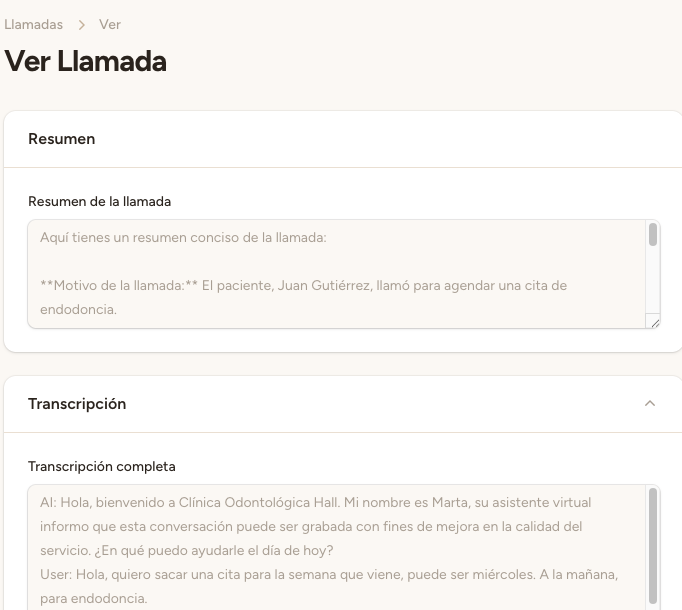
Conversational confirmation
The assistant <strong>always confirms verbally</strong> with the patient before performing any action. This ensures no mistakes are made and the patient has the final say.
Example confirmation dialogue:
«I'm going to schedule a Dental cleaning appointment for Tuesday, May 5th at 9:00 AM with Dr. Carlos Fernández. Confirm?»
Only after the patient responds affirmatively («yes», «okay», «sure», etc.) does the assistant proceed to create the appointment in the system.
Patient matching
When a patient calls, the assistant tries to identify them automatically using a 3-tier system:
<strong>Phone matching</strong> — If the caller's phone number matches a patient registered in the system, they are automatically linked.
<strong>Name matching</strong> — If there's no phone match, the assistant searches by the patient's full name.
<strong>Create new patient</strong> — If no match is found, the assistant creates a new patient record with the information provided during the call.
Seamless integration
For the patient, the experience is completely natural. <strong>They don't know they're speaking with artificial intelligence.</strong> The call works as if a human receptionist from your clinic answered.
The «Davoxly» brand is never mentioned during calls. All the technology works invisibly in the background.
ℹ️ Automatic updates
When you modify your clinic's data (services, professionals, schedules, holidays), the assistant updates automatically. You don't need to do anything manually — changes are reflected in the assistant within seconds.