What are schedules?
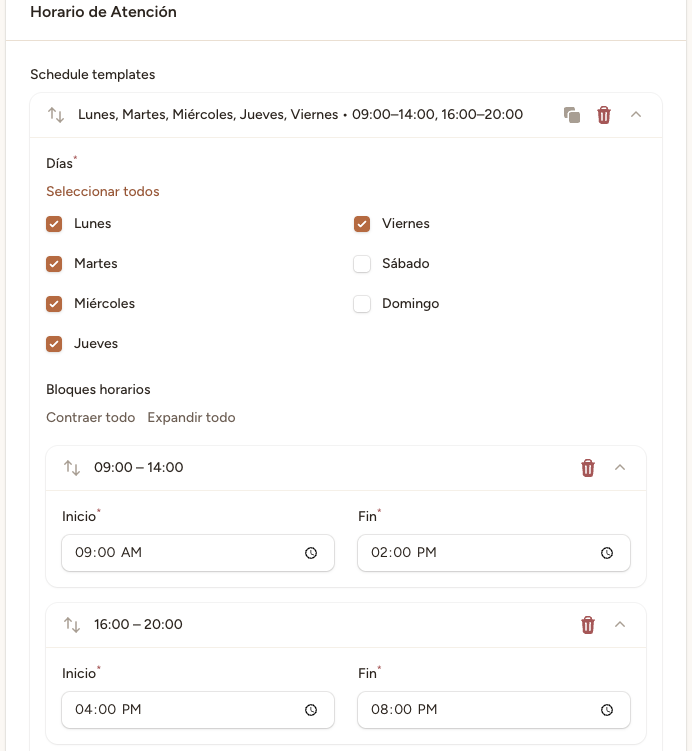
Schedules are time blocks that define when each professional works. They are typically set up in two shifts: morning (for example, 09:00–14:00) and afternoon (for example, 16:00–20:00). The AI assistant will only book appointments within these time blocks.
Step 1 — Go to the professional's schedules
Go to «Profesionales» in the side menu, click on the professional's name, and then select the «Horarios» tab.
Step 2 — Add a time block
Click «Añadir horario». Select the day of the week, start time, and end time. For example: Monday, 09:00 – 14:00.
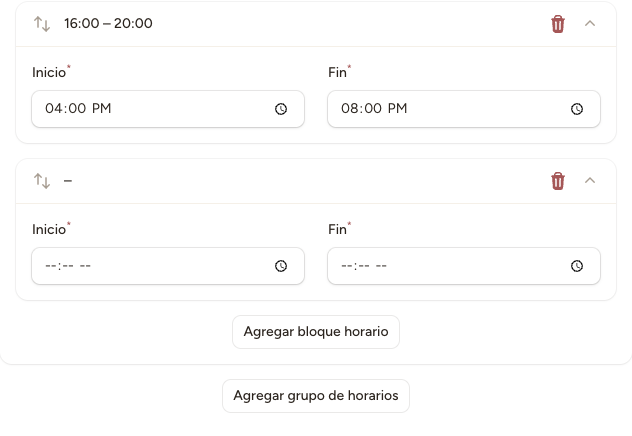
Days of the week are numbered from 0 (Monday) to 6 (Sunday). You can add multiple blocks for the same day, for example a morning shift and an afternoon shift.
Step 3 — Repeat for each working day
Repeat the process for each day the professional works. Most professionals have 2 blocks per day (morning and afternoon) and work Monday to Friday. If a professional does not work on a particular day, simply do not add a schedule for that day.
The AI assistant will not book appointments outside the configured schedules. If a professional has no schedule for a day, the system will treat them as unavailable. Make sure schedules are set up correctly to prevent the AI from offering non-existent time slots.