Voice provider
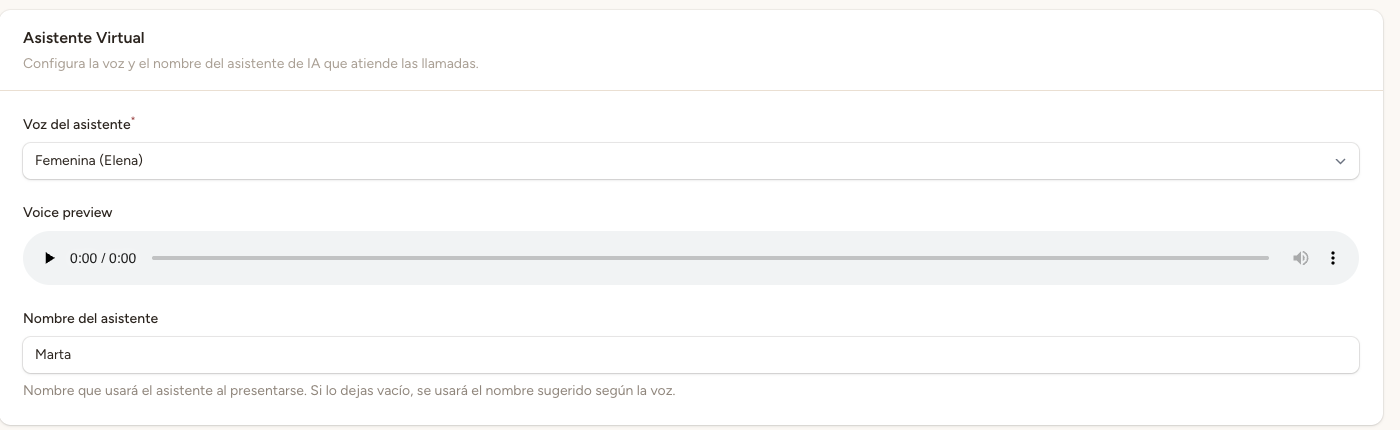
The assistant uses Vapi's native voices (Vapi Voices v2), available in European Spanish and ready to use with no extra setup. You can choose from:
- Clara — Female voice (default). European Spanish (es-ES), natural and warm.
- Elliot — Male voice. European Spanish (es-ES), clear and professional.
Both voices are configured with the provider «vapi», version 2 and language es-ES. You don't need to provide any external voice identifier or model.
💡 Tip
You can listen to a sample of each voice before saving changes using the player in the voice section.
Voice settings
Stability and similarity boost are specific to the ElevenLabs provider and do not apply to native Vapi Voices v2. If a legacy ElevenLabs provider is used in the future, these settings remain available for that provider.
Transcriber (speech-to-text)
The transcriber is the service that converts the patient's speech into text so the assistant can process it. Configure the following parameters:
- Provider — The transcription service. Default: Deepgram, which offers excellent accuracy and low latency.
- Model — The transcription model. Default: Nova-3, Deepgram's most advanced model for Spanish.
- Language — The transcription language. Set to Spanish by default. Not recommended to change unless your clinic serves in another language.
AI model
The AI model is the assistant's «brain» that processes the conversation and generates responses. Configure:
- Provider — The AI model provider. Default: OpenAI.
- Model name — The specific model to use. Default: gpt-4o-mini, which offers an excellent balance between response quality and speed.
- Temperature — Controls response creativity. Value between 0 and 1. A low temperature (0.2-0.4) produces more predictable, conservative responses. A high temperature (0.7-1.0) produces more varied, creative responses. Default: 0.5.
⚠️ High temperature
A high temperature (above 0.7) can cause unpredictable or inconsistent responses. For a medical/professional assistant, it's recommended to keep the temperature between 0.3 and 0.6 to ensure reliable, professional responses.
First message
The first message is what the assistant says when answering the call. You can fully customize it using free text with placeholders:
- {clinic_name} — Automatically replaced with your clinic's name.
- {assistant_name} — Automatically replaced with the assistant name configured in general settings.
Example first message:
«Hello, thank you for calling {clinic_name}. My name is {assistant_name}, how can I help you today? This call may be recorded to improve our service.»
Maximum call duration
Defines the maximum time a call can last. If this limit is reached, the call ends automatically. The default value is <strong>600 seconds (10 minutes)</strong>.
Adjust this value based on your clinic's needs:
- Clinics with quick appointments — 300-480 seconds (5-8 minutes) may be sufficient for most booking calls.
- Clinics with complex services — 600-900 seconds (10-15 minutes) allow longer conversations with detailed queries about services and availability.