Step 1 — Go to the Services section
Open your clinic panel and click «Servicios» in the side menu. Then click the «Nuevo servicio» button.
Step 2 — Fill in the service details
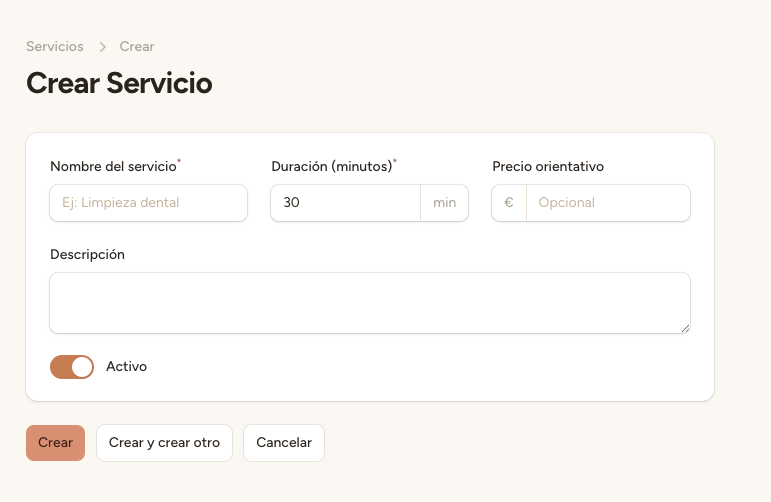
Fill in the service details:
Name — For example, «Dental cleaning», «Filling», «Whitening». Use clear and descriptive names.
Duration (minutes) — How long the appointment lasts, for example 30 minutes for a cleaning, 60 minutes for a root canal.
Price (€) — Service price in euros. This is optional: if left blank, it will display «consultar» (ask for price).
Description — Brief description of the service (optional but recommended).
The price is optional. If you leave it blank, the AI assistant will tell the patient to «ask for price». This is useful for services with variable pricing or that require prior evaluation.
Step 3 — Assign professionals
In the «Profesionales» section of the form, select which professionals can perform this service. You can assign multiple professionals to the same service.
The AI assistant uses the service name to identify what the patient is requesting during a call. Use clear and common names so the AI can correctly match patient requests with available services.
Step 4 — Save
Click «Guardar» to create the service. The AI prompt will update automatically to include the new service in the list the assistant offers to patients.